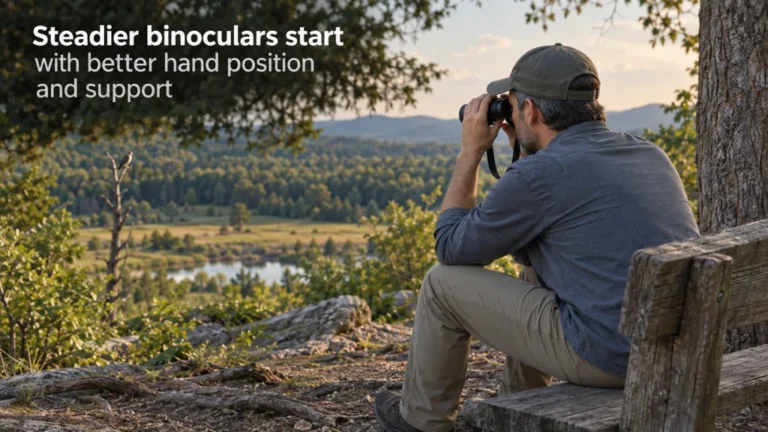
Binocular shake is usually best handled in stages, starting with grip and body support before adding equipment. A wall, railing, chair, knee, monopod or tripod can each help, but each adds a different amount of stability, setup time and restriction. Magnification, binocular mass, viewing duration and posture all affect how much support is useful, so no single cutoff works for everyone. The practical goal is the least burdensome support method that keeps the view usable for the observation you are actually making.
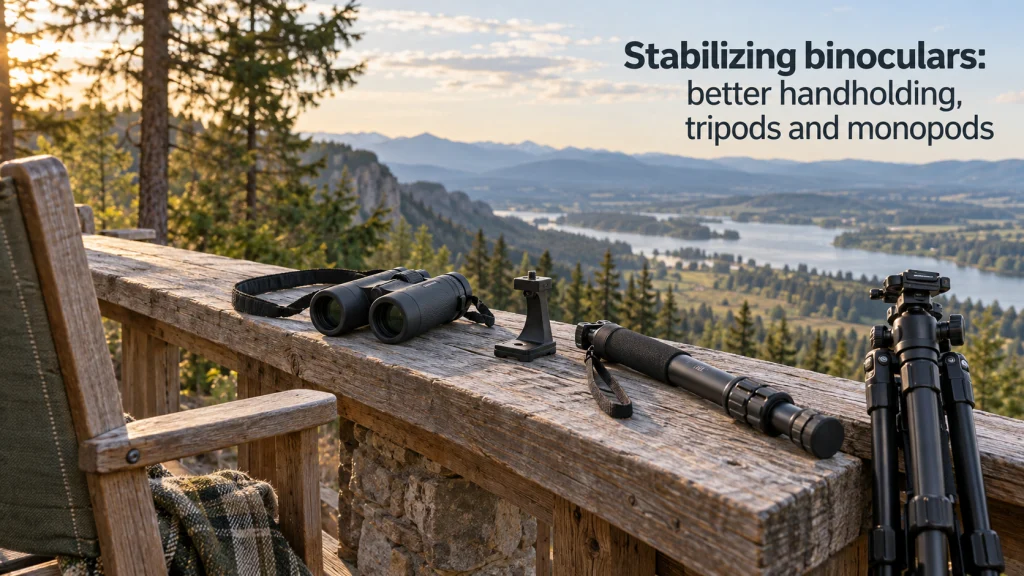
Stability is a ladder, not a handheld or tripod choice
Learning how to stabilize binoculars starts with a simple tradeoff: every extra layer of support can make the image steadier, but it also costs something in speed, mobility or setup effort. If a relaxed handheld grip gives you a usable view for a short scan, a tripod can be unnecessary baggage. If the image keeps wandering during a long look, however, refusing support just to stay mobile can make the binoculars harder to use than they need to be. The useful question is how much support the current observation actually requires.
I would move up the support ladder only when the current level stops working for the viewing task. That means checking technique first, then using nearby support, then considering a monopod or tripod when the added stability justifies the extra equipment. This approach fits the broader process of using binoculars well: adjust the instrument and your posture around the actual observation instead of treating one setup as universally correct. A support method earns its place only when it improves the view enough to offset the burden it adds.
Identify what is moving before you add more support
Not every unstable view has the same cause. Ordinary hand motion can move the image slightly even when your grip is sound, while unsupported elbows often add larger wandering movement. Fatigue can make a view that seemed acceptable at first become difficult later, and higher magnification makes a given amount of hand movement more visible in the image. A support setup can also create its own problem if an adapter, head or locking point is loose.
Start by observing what changes when you alter one condition at a time. Sit down, bring your elbows closer to your torso, rest against a solid surface, and see whether the image settles. If the movement is still confusing, the separate guide to why binoculars shake helps separate normal movement and setup problems without turning the question into medical diagnosis. The point here is narrower: identify whether better posture, less fatigue or mechanical support is the next useful step.
- If the view improves immediately when your elbows are supported, posture is a major part of the problem.
- If stability fades during a longer observation, fatigue is probably part of the decision even if the binoculars feel manageable at first.
- If a mounted binocular still shifts after you stop touching it, check the support setup and documented attachment points before blaming your hands.
- If a higher magnification configuration is harder to hold steady, treat that as a tradeoff rather than proof that the binoculars are defective.
These checks keep the solution proportional to the problem. A slightly restless handheld view may need only better bracing, while persistent movement during long observation can justify equipment. Use the result of that comparison to decide whether the problem is technique, fatigue or a genuine need for mechanical support.
Start with grip, elbow position and body support
A stable handheld position begins with a relaxed two-handed grip and elbows brought toward the body instead of flared outward. Nikon’s guidance for binocular use recommends holding the tubes with both hands, bracing the elbows against the body and avoiding an excessively hard grip because extra tension can add movement. The useful lesson is not a single hand position that everyone must copy. It is that your hands, arms and torso should work as one supported structure rather than three separate sources of motion.
Grip also has to leave room for focusing and fit adjustments. If you squeeze so hard that turning the focus wheel requires a sudden release and regrip, the view will jump every time the subject distance changes. A lighter hold that keeps the binocular balanced can be more stable than a stronger hold that creates muscle tension. For a more detailed sequence of hand placement and bracing, use the guide on how to hold binoculars steady.
Standing position matters too. Plant your feet comfortably, avoid leaning backward to compensate for the binoculars, and bring the eyepieces to your eyes rather than pushing your head forward to meet them. If you wear glasses, keep the eyecup and eye relief setup correct while testing stability, because a posture that feels steady but loses the full field is not a useful solution. Good stabilization should preserve both physical comfort and the view you bought the binoculars to provide.
Run the owner checks before escalating to equipment
Before adding a support, make the easy changes that cost almost nothing in mobility. The same binocular can feel noticeably steadier when you sit, lower your elbows onto a solid support, or move from an unsupported stance to a position against a wall or tree. These changes are especially useful when the observation is brief and you still need to move quickly. They also tell you whether a larger support system would solve the actual problem or simply add gear.
There is no universal line where handheld use becomes inadequate. One person may be comfortable with a configuration that another finds tiring, and the same person can tolerate more movement during a quick identification than during a long attempt to resolve fine detail. Magnification and mass matter, but duration, viewing angle and available bracing matter with them. Treat all of those variables as context for the next step.
Add a solid brace before declaring handheld use inadequate
A wall, railing, chair back, table edge, knee, tree or other firm surface can remove part of the movement without turning the binoculars into a stationary setup. Nikon specifically recommends leaning against a tree or wall and supporting binoculars on stable objects when available. Keep enough control to avoid scraping or striking the binocular body against a hard surface, and do not rest lenses or eyecups directly on rough material. If this level of support gives you the view you need, moving to a mount may solve a problem you no longer have.
Separate short mobile viewing from long observation
Duration changes the usefulness of every stabilization method. Handholding can be ideal when you are repeatedly raising and lowering the binoculars for short looks, but the same posture can become tiring when the instrument stays at eye level for an extended period. A chair, railing or monopod may be enough when the main problem is arm fatigue rather than fine image motion. A tripod becomes more attractive when you want sustained viewing with minimal load on your hands and arms.
Use magnification and mass as context, not universal cutoffs
Higher magnification generally makes hand movement more visible, while greater mass can increase fatigue, but those two effects do not create a single rule such as “10x requires a tripod.” Balance, grip shape, body position and viewing duration can change the result substantially. Even manufacturer guidance that recommends tripods for higher magnification should be read as a practical signal, not a universal threshold for every user and situation. Test whether support improves the view enough to justify what you give up in speed and portability. The same binocular may be easy to handhold for a quick scan and tiring during a prolonged fixed view.

This three-leg stool weighs 2 pounds and has a 16-inch seat height. Amazon lists a 250-pound weight limit and 600D polyester material. It gives the owner-check section a portable way to test seated viewing and elbow support before escalating to a mount.
Check on AmazonIf you click this link and buy, we earn a commission at no additional cost to you.
Choose a tripod when stability and fatigue relief justify the setup
A tripod is the strongest step in this ladder when the viewing position can stay relatively fixed. It removes the need to support the binoculars continuously and can make long observation much more relaxed, especially when magnification or binocular mass makes small movements difficult to control. The tradeoff is equally real: three legs need floor or ground space, setup takes time, and moving to a new position is slower than simply raising a handheld binocular. That makes a tripod most valuable when steadiness matters more than immediate repositioning.
The best question is not whether a certain magnification “needs” a tripod. Ask whether the current view is unstable enough, or the observation long enough, that the benefit exceeds the setup burden. Celestron’s support guidance similarly frames tripod use around magnification, weight and longer viewing rather than treating one number as the only trigger. The separate guide on when to use a tripod with binoculars goes deeper into that decision.
Tripods also make more sense when multiple people need to return to the same fixed view, when you are examining a stationary subject for a long period, or when repeated handheld fatigue keeps ending the observation early. They make less sense when you are moving constantly, working in a tight space or following subjects that require frequent repositioning. Stability is useful only if the support still lets you observe effectively. A perfectly steady setup that is too slow for the viewing situation is still the wrong setup.

The TrailSeeker tripod uses a fluid pan head and quick-release plate for controlled repositioning. It is designed for spotting scopes, binoculars and cameras, making it appropriate after a compatible binocular adapter is confirmed. It suits observations where a fixed platform is worth more setup than handholding.
Check on AmazonIf you click this link and buy, we earn a commission at no additional cost to you.
Attach a tripod only through the documented compatible interface
Once a tripod is clearly the right support, compatibility becomes the next decision. Do not assume that a binocular is tripod-ready because another model from the same brand looks similar, and do not assume that an adapter labeled universal will fit every bridge shape or mounting socket. Check the exact binocular manual, manufacturer accessory page or compatibility statement before attaching anything. The interface, clearance around the hinge and adapter style can vary by model.
With compatibility confirmed, the owner-level task is simple: use the documented adapter or mounting method, seat the connection fully, and tighten only as instructed by the manufacturer. Then verify that the binoculars do not rotate, sag or shift when you release your hands. If a mount remains loose or requires improvised pressure on the optical body, stop rather than forcing the connection. The detailed walkthrough for an already compatible setup is in how to attach binoculars to a tripod.
- Verify the exact binocular model and the support interface before installation.
- Use the adapter or attachment method documented for that interface.
- Check clearance for focusing, hinge movement and normal viewing position.
- After mounting, confirm that the support stays stable without excessive tightening.
This compatibility check matters because stabilization equipment should reduce movement, not create a new source of looseness or stress. If the connection is correct but the view still vibrates, inspect the support head, locks and ground contact before escalating to a heavier solution. A secure interface is the baseline for judging any tripod or monopod fairly. Only after that baseline is sound does it make sense to compare one support method with another.

This quick-release adapter uses 1/4-20 threading and is intended for compatible roof and Porro binoculars. Its detachable mount supports quick separation from the support system. Verify the exact binocular mounting socket and clearance before installation.
Check on AmazonIf you click this link and buy, we earn a commission at no additional cost to you.
Use a monopod when mobility matters more than hands-free stability
A monopod occupies the middle of the support ladder. It transfers much of the binocular weight to the ground and reduces some vertical and rotational movement, but it still depends on the user for balance and aiming. That makes it less stable than a tripod and more mobile in return. In a crowded viewing area, along a trail or during frequent position changes, that compromise can be more useful than maximum steadiness.
Celestron’s support guidance makes the same distinction: a tripod offers stronger hands-free stability, while a monopod takes less space and can suit situations where movement matters. The exact result still depends on binocular mass, the head or adapter, the surface and how much control you need over viewing angle. For owner-level setup and positioning, see using binoculars on a monopod. Think of the monopod as a way to offload weight and limit movement without fully fixing the binoculars in place.
A monopod is not a miniature tripod that can be left unattended. Keep control of the binoculars and support, plant the foot securely, and avoid relying on it as a self-standing mount unless the manufacturer explicitly designs and rates the setup for that use. If you need to release both hands or preserve a fixed view while stepping away, the support requirement has moved beyond what a conventional monopod is meant to provide. In that case, the tripod’s larger footprint is buying a capability you actually need.

The Element MII is a five-section aluminum monopod with twist locks, a rubber grip and a wrist strap. Amazon lists a maximum load of 15 kg. Pair it with a binocular adapter and head that match the exact binocular interface rather than attaching unsupported binoculars directly.
Check on AmazonIf you click this link and buy, we earn a commission at no additional cost to you.
Compare tripod and monopod by what they cost you in use
The practical difference between a tripod and a monopod is not simply three legs versus one. Each support changes how quickly you can move, how much ground space you need, how easily another person can use the same view, and how much effort remains in your hands. Choosing between them is therefore a workflow decision as much as a stability decision. The better support is the one that removes enough movement without obstructing the way you actually observe.
| Decision factor | Tripod | Monopod |
|---|---|---|
| Maximum steadiness | Stronger choice for a fixed, supported view | Improves steadiness but still needs user control |
| Mobility | Slower to reposition | Faster to move and reset |
| Setup time | More steps and more adjustment | Usually quicker |
| Ground space | Needs room for three legs | Needs much less floor or ground area |
| Hands free viewing | Possible with a stable, properly locked setup | Normally no |
| Sharing a fixed view | Easier when the position should stay unchanged | Usually requires the next viewer to take control |
| Changing viewing angle | Stable but can require head and leg adjustment | Quick to redirect, with less fixed support |
If you repeatedly stop in one place and study the same area, the tripod’s extra setup may pay for itself through steadier, less tiring viewing. If you need support but keep moving, a monopod often preserves more of the quick handling that makes binoculars useful in the first place. The full comparison in tripod versus monopod for binoculars is useful when those two options both seem plausible. Choose from the observation pattern first, then let the hardware follow that decision.
There is also a valid fourth answer: neither. Good handholding with a solid brace may already meet the stability requirement, especially for short observations. Support gear should be an escalation based on a visible problem, not an automatic accessory list attached to binocular ownership. Keeping the simpler method is a real decision when it preserves speed without making the view unusable.

The Traveler 7C is a carbon-fiber tripod that converts to a monopod, so one support can cover both sides of this comparison. It includes an E-10 360-degree ball head and an Arca-Swiss quick-release plate, with a listed load capacity up to 17.6 pounds. Binocular use still requires a compatible adapter between the binocular and support.
Check on AmazonIf you click this link and buy, we earn a commission at no additional cost to you.
Final Thoughts: move up the support ladder only when the previous level stops working
Start with the least restrictive fix. Relax the grip, bring the elbows in, use your body as support and borrow a solid surface when one is available. If the view becomes unusable mainly with time, treat fatigue as part of the stability problem rather than assuming you need more magnification, more weight or more equipment. A short handheld look and a long fixed observation do not demand the same level of support.
Move to a monopod when you need meaningful support without giving up easy repositioning, and move to a tripod when a fixed, hands-free platform solves enough shake or fatigue to justify the setup. Before attaching either one, verify the exact interface for your binoculars. A stable view is not the result of choosing the biggest support system; it is the result of matching support to the observation. Stop escalating as soon as the view is steady enough for the job.
Explore the stabilization steps in more detail
Use these focused guides when one part of the stabilization ladder needs a closer look. They separate diagnosis, handheld technique and support setup so you can solve the specific problem without repeating the entire process. Start with the point where instability first becomes noticeable, not with the most complicated support option. That keeps the next step tied to a real viewing problem rather than an equipment checklist.
| Topic | What you will find |
|---|---|
| How to hold binoculars steady | Grip, elbow position and body support for steadier handheld viewing. |
| Why binoculars shake | A practical way to separate normal hand movement, fatigue and setup issues. |
| When to use a tripod with binoculars | How to decide when added stability is worth the setup time and footprint. |
| How to attach binoculars to a tripod | Owner level attachment steps after exact compatibility has been verified. |
| Binoculars on a monopod | How a one-leg support changes stability, mobility and user control. |
| Tripod versus monopod for binoculars | A direct comparison of steadiness, movement, setup, space and sharing. |
Start with the guide that matches the point where your current setup fails, then change only what is necessary to make the view usable. If handholding works, stay there. If bracing works, there is no need to add a mount. Move farther down the ladder only when the previous level still leaves the image too unstable or the observation too tiring.
Frequently asked questions
🔭 What is the easiest way to steady binoculars without a tripod?
Use a relaxed two-handed grip, bring your elbows toward your torso and add a solid brace such as a wall, railing, chair or knee when available. If that gives you a usable view for the time you normally observe, there is no need to escalate to a mount.
🪑 Does sitting down make binoculars steadier?
It often can because your body has more support and your elbows may have a stable place to rest. The benefit depends on the chair, viewing angle and whether you can keep a comfortable eye position without leaning or twisting.
🔎 Do higher magnification binoculars always need a tripod?
No. Higher magnification generally makes hand movement more visible, but tripod need also depends on binocular mass, balance, viewing duration, posture and how steady the view must be for the task. Use support when it produces enough practical improvement to justify the added setup.
🥾 Is a monopod steadier than handholding?
A properly used monopod can reduce movement and carry much of the binocular weight, but it still needs user control. It is usually a compromise between handheld mobility and the stronger fixed support of a tripod.
🧩 Can any binoculars be attached to a tripod?
No. Compatibility depends on the exact binocular and the documented mounting interface or adapter. Check the manufacturer manual or compatibility information before attaching a tripod or monopod instead of relying on appearance or a universal label.
⏱️ Why do binoculars get shakier the longer I hold them?
Arm and shoulder fatigue can reduce your ability to maintain the same position, even if the binoculars felt manageable at first. For longer observation, add body support, sit down or move to a monopod or tripod if the added stability is worth the loss of mobility.
References and Sources
- Nikon binocular holding and tripod guidance: supports relaxed two handed holding, elbow bracing, solid surface support and tripod use for longer or higher magnification observation.
- Celestron tripod guidance: supports treating magnification, binocular weight and viewing duration as factors in the decision to add tripod support.
- Celestron tripod and monopod comparison: supports the stability, mobility and ground space tradeoffs between the two support types.